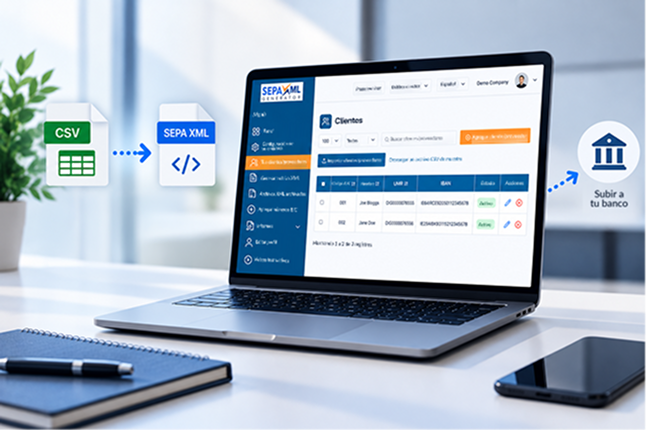
The accounting spreadsheet is ready. But is the information ready for the bank? Between recording a payment obligation in an accounting system and turning it into a SEPA payment instruction, there is an additional step that can take time — particularly when a business processes dozens of transactions.
SEPA payment automation aims to bridge this gap by using data already recorded in accounting software to prepare XML files, while maintaining the necessary checks and approvals. The process does not necessarily require complex integration, but it does require a clear understanding of what each tool does.
What does SEPA payment automation mean?
Automating SEPA payments means reducing repetitive tasks when preparing banking instructions by using information already available in accounting or business management software. Instead of manually entering names, IBANs, amounts and references again, these existing records can be used to generate payment files.
However, automation does not mean that a payment has been executed. Preparing an XML file, validating it and submitting it to the bank are separate stages from authorisation, processing and settlement. A file may be technically correct but still require operational checks by the financial institution.
It is also important to identify the type of transaction. For transfers initiated by the payer, such as supplier payments, the ISO 20022 pain.001 message family is used. SEPA Direct Debit collections, on the other hand, use the pain.008 message family and require the relevant mandates and applicable conditions.
How does accounting data become an XML file?
The process starts with the source data: an accounting system records who needs to be paid or who owes money, how much is due and what the payment relates to. This information must then be exported or transmitted in a format that the payment preparation tool can interpret.
One common approach is to generate a CSV file, a tabular format that organises records into rows and columns. Another option, where supported by the systems involved, is to use an API to transfer data between applications. The records are then converted into XML messages according to the relevant payment scheme and the format required by the bank.
The European Payments Council Implementation Guidelines provide guidance on using ISO 20022 messages within SEPA schemes. In addition to these rules, banks may specify accepted versions, submission channels, limits and particular validation requirements.
CSV or API: which approach makes sense?
CSV and API serve different needs. CSV is well suited to preparing payment batches from periodic exports, while an API can connect systems and reduce manual intervention, provided a compatible and tested integration is in place.
Comparing the alternatives
CSV — exports tabular data for subsequent import or conversion. Columns, data types, duplicates and import errors must be checked.
API — enables information to be exchanged between connected systems. Authentication, data mapping, error handling and the scope of the integration must be confirmed.
SEPA XML — the payment instruction file generated from the prepared data. The payment scheme, file version, banking requirements and authorisations must all be verified.
None of these approaches removes the need for review. The right choice depends on payment frequency, the business’s technical capabilities and the confirmed features of both the accounting software and the SEPA tool. Automatic compatibility with every system should never be assumed.
A practical example of a payment batch
Imagine a fictional company that needs to pay eight suppliers. Its accounting software generates a CSV file containing identifiers, IBANs, amounts in euros and invoice references. Before creating the bank payment file, the finance team spots a duplicate reference and an IBAN that has been entered inconsistently.
After correcting the source data, the company prepares a pain.001 XML file for the transfers. The responsible team checks the total batch amount, the number of payment instructions and the internal approvals before submitting the file through the channel provided by the bank.
This example illustrates a possible process, not an actual transaction, a verified integration or a test carried out using SEPA XML GENERATOR. Required fields and the exact steps involved vary depending on the financial institution and the banking service used.
Which checks should not be automated without proper controls?
Effective automation does not mean removing people from the process. The aim is to focus human involvement on decisions and checks that require context, particularly when dealing with new beneficiaries, unusual payment amounts or changes to bank account details.
Pre-submission checklist
Source data: check beneficiaries, IBANs, amounts, currency and references. Batch quality: identify duplicates, empty fields, totals and the number of transactions.
Format and bank requirements: verify the appropriate pain message, XML version and import rules. Governance: maintain batch approvals, access permissions and records of changes. Bank responses: monitor acceptance, errors and subsequent reconciliation.
Structural validation can identify errors in how an XML file is organised, but it cannot confirm that a beneficiary exists, that a payment has been authorised or that the bank will execute it. For this reason, automated checks should be combined with approval procedures and monitoring of payment outcomes.
How does SEPA XML GENERATOR fit into the process?
SEPA XML GENERATOR offers features for preparing SEPA Credit Transfer and SEPA Direct Debit files, including CSV import and conversion. The company also describes a SEPA API-based approach in which accounting software generates a CSV file and connects it to the platform’s account for processing.
This makes it possible to explore automation without assuming direct integration with every ERP system or automatic submission to the bank. The publicly available documentation describes file generation features, while specific implementation requirements, authentication and compatibility must be assessed according to the systems being used.
To understand the import, generation and validation stages, consult the Product Tour and compare the workflow presented with your bank’s requirements. The platform’s documentation on converting CSV files to SEPA XML also provides useful context for this approach.
Frequently asked questions about SEPA automation
Can SEPA XML files be generated from a CSV file?
Yes. Tools that support CSV-to-XML conversion can use data exported from accounting software, provided the columns and information meet the requirements of the relevant payment process.
Does an API eliminate all manual steps?
Not necessarily. Even when data transfer is automated, testing, beneficiary checks, batch authorisation and monitoring of bank responses may still be required.
Does generating an XML file mean the payment has been made?
No. The XML file contains payment instructions. Acceptance, execution and settlement depend on bank processing and the applicable rules.
Automate payment preparation without losing control
SEPA payment automation starts with reliable data and a clearly defined workflow, not simply with choosing software. By connecting accounting processes to XML file preparation and maintaining checks at every stage, businesses can reduce repetitive work without confusing file generation with completed payments.
Explore the options for API-based automation and the features presented in the SEPA XML GENERATOR Product Tour to assess the most suitable approach for your business.