SEPA Direct Debit Guide: Everything Businesses Need to Know
SEPA Direct Debit allows businesses to collect payments in euro directly from their customers’ bank accounts, provided they have obtained prior authorisation. It offers a practical way to manage recurring payments, reduce manual administration and make cash flow more predictable.
However, using this payment system requires an understanding of direct debit mandates, banking rules and the XML files used to submit collections.
In this SEPA Direct Debit guide, you’ll learn how the system works, what requirements businesses need to meet and how to prepare SEPA Direct Debit XML files for submission to their bank.
Table of Contents
- What is SEPA Direct Debit?
- How does SEPA Direct Debit work?
- SEPA Core vs SEPA B2B: What are the differences?
- How do you generate a SEPA Direct Debit XML file?
- How does SEPA XML Generator simplify the process?
- Frequently asked questions about SEPA Direct Debit
What is SEPA Direct Debit?
SEPA Direct Debit (SDD) is a payment scheme that enables businesses to collect payments in euro from bank accounts within the Single Euro Payments Area (SEPA).
It allows businesses to initiate payments authorised by their customers, without requiring customers to make a manual bank transfer each time a payment is due.
This makes it particularly useful for businesses offering subscriptions, memberships, ongoing services and other recurring payments. It can also be used for one-off collections, depending on the conditions of the scheme.
Transactions follow the rules established by the European Payments Council (EPC), which manages the SEPA payment schemes.
One of the main advantages for businesses is the ability to process collections in batches, combining multiple transactions into a single, standardised workflow.
How does SEPA Direct Debit work?
SEPA Direct Debit involves three main parties: the business collecting the payment, the customer authorising the debit and the financial institutions responsible for processing the transaction.
The process begins when the payer grants authorisation and ends when the collection is processed through the banking system, provided all applicable requirements are met.
The role of the SEPA Direct Debit Mandate
A SEPA Direct Debit Mandate is the authorisation a customer gives to a business to initiate direct debits from their bank account.
The mandate contains information needed to identify and validate the authorisation, including the creditor’s details, the payer’s identification information and a unique mandate reference.
The business collecting the payment must obtain and retain the mandate in accordance with the rules of the relevant SEPA scheme.
Without a valid mandate, a collection may be considered unauthorised, potentially resulting in disputes and refund claims.
From authorisation to bank processing
Once a valid mandate has been obtained, the business gathers the necessary information and prepares its collection instructions.
The process generally involves five steps:
- Authorisation: The customer provides a valid SEPA Direct Debit Mandate.
- Preparation: The business gathers bank account details, payment amounts, references and collection dates.
- File generation: The collection instructions are organised into an XML file that meets the applicable requirements.
- Submission: The XML file is submitted to the bank or payment service provider.
- Processing: The financial institutions involved check and process the transactions, which may be accepted, rejected or returned.
It’s important to distinguish between preparing a payment file and processing the actual transaction. Generating an XML file does not mean that a payment has been completed.
SEPA Core vs SEPA B2B: What are the differences?
SEPA Direct Debit operates under two main schemes: SEPA Core and SEPA Business-to-Business (B2B).
Both allow businesses to collect payments by direct debit, but they differ in terms of eligible payers, mandate requirements and refund rights.
| Feature | SEPA Core | SEPA B2B |
| Eligible payers | Consumers and businesses | Businesses only |
| Mandate | Required | Required, with specific verification by the payer’s bank |
| Refunds for authorised collections | Within eight weeks, without giving a reason | No refund right under the scheme |
| Unauthorised collections | May be disputed under the applicable rules | Subject to the scheme’s specific rules |
| Availability | More widely available | Depends on bank participation and support |
Under SEPA Core, payers have the right to request a refund for an authorised collection within eight weeks of the debit date, without providing a reason. For unauthorised transactions, the refund claim period may extend to 13 months.
Under SEPA B2B, the same refund right does not apply to authorised collections. The payer’s bank must also verify the mandate details before processing the transaction.
Choosing between the two schemes depends on your customer base, your bank’s requirements and your business’s operational needs.
Full details are available in the official SEPA Core and SEPA B2B rulebooks.
How do you generate a SEPA Direct Debit XML file?
To submit collections in batches, businesses can use XML files structured according to the ISO 20022 standard and the requirements of the relevant SEPA scheme.
One of the message types used for SEPA Direct Debit is pain.008, which structures direct debit collection instructions sent by a business to its payment service provider.
The file contains the information needed to identify the parties involved, their mandates and the individual transactions.
What information is required?
Preparing a SEPA Direct Debit XML file requires accurate, consistent information that complies with the applicable scheme rules.
The details typically required include:
- Creditor identification and bank account details.
- Payer’s name and IBAN.
- Creditor Identifier.
- Mandate reference and mandate date.
- Collection amount and requested collection date.
- Transaction identification and any additional required information.
Depending on the bank, scheme and message version, additional fields or checks may be required.
For this reason, it’s important to confirm your bank’s file requirements before submitting any collection instructions.
How does pain.008 file generation work?
A pain.008 file uses a standardised XML structure to represent direct debit collection instructions.
Businesses must organise the information into the correct fields, follow the required formatting rules and use a message version supported by their bank.
Errors in bank account details, mandate references or XML structure can lead to rejected files and delayed collections.
Dedicated SEPA Direct Debit XML tools can help reduce the manual work involved in file preparation, particularly when businesses need to include multiple transactions in a single file.
How does SEPA XML Generator simplify direct debit collections?
SEPA XML Generator is an online platform designed to help businesses create XML files for SEPA Direct Debit and SEPA Credit Transfer transactions.
Rather than manually building each XML file, users can enter the required information, organise payments and generate files for submission to their bank.
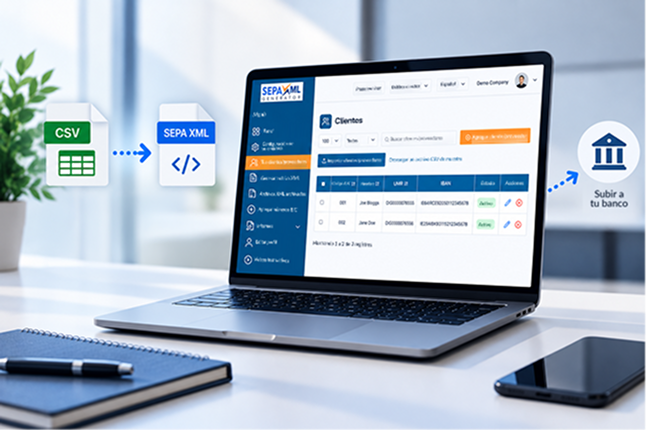
The platform offers features including CSV customer imports, CSV-to-XML conversion, batch collection file generation and file validation.
It also provides tools for editing payment amounts, managing multiple bank accounts and integrating payment workflows through an API.
The Product Tour provides an overview of these features, including customer setup, data imports and XML file generation.
These capabilities can make preparing direct debit collections more straightforward. However, they do not replace the need for valid mandates, accurate payment information or compliance with your bank’s requirements.
Frequently asked questions about SEPA Direct Debit
What is the difference between SEPA Direct Debit and SEPA Credit Transfer?
With SEPA Direct Debit, the creditor initiates the collection based on authorisation from the payer. With SEPA Credit Transfer, the payer initiates the transfer themselves. Both support euro payments, but they use different processes and payment messages.
Do businesses need a SEPA Direct Debit Mandate to collect payments?
Yes. A SEPA Direct Debit Mandate provides the authorisation a creditor needs to initiate collections from a payer’s bank account. Businesses must obtain and retain mandates in accordance with the rules of the relevant SEPA scheme.
Do all banks accept the same SEPA XML file format?
Not necessarily. Although SEPA XML files follow common standards, individual banks may require specific message versions, additional fields or their own submission and validation procedures. Businesses should confirm compatibility with their bank before using a file.
Simplify SEPA Direct Debit XML file generation
Preparing direct debit collections requires careful attention to payment details, mandates and the structure of the XML files submitted to your bank.
With a dedicated tool, your business can organise these steps more efficiently and reduce manual administration.
Explore SEPA XML Generator, discover its features and find the option that best suits your business’s payment collection needs.
Explore the platform or view the available pricing plans.